In this article
- Why operating-system upgrades matter for your business
- What Windows 10 changed about how we think of upgrades
- How to plan an OS migration without disrupting your business
- Choosing the right edition and licensing
- Security, backups and lifecycle management
- Beyond the OS: modernising your full digital stack
- Related Services
- Frequently Asked Questions
Planning an operating-system upgrade, as many businesses did when Windows 10 launched in 2015, is one of those decisions that quietly shapes how secure, productive and future-ready your business actually is. When Microsoft first set Windows 10 free for eligible PCs and tablets, it changed how organisations thought about OS upgrades: less a one-time purchase, more an ongoing, cloud-connected platform. This guide turns that moment into a durable playbook, so whether you are weighing an upgrade today, preparing for the next version of Windows, or simply trying to keep your team's devices safe and modern, you will know exactly what to plan for, what to budget, and how to migrate without disrupting your business.
Editor's note: This article was originally published in July 2015 to announce that Microsoft would release Windows 10 on 29 July 2015 as a free upgrade for eligible Windows 7 and Windows 8.1 devices. We have re-written it as an evergreen guide to planning operating-system upgrades and digital infrastructure modernisation for Indian businesses. Specific dates and offers from the original 2015 announcement are kept only as historical context, not current facts. Windows 10 itself reached end of support on 14 October 2025; Microsoft now recommends moving to Windows 11, with Extended Security Updates for those who need more time.
In plain terms, an operating-system upgrade is the process of moving the computers, laptops and tablets your team uses to a newer, supported version of their OS, so they keep receiving security patches, performance improvements and new features instead of slowly becoming a liability.
Why operating-system upgrades matter for your business
It is tempting to treat an OS upgrade as an IT chore and put it off. In reality, the version of Windows (or macOS, or Android) your team runs touches almost everything: data security, application compatibility, employee productivity and even the impression you make on clients during a screen-share.
- Security first: Older, unsupported operating systems stop receiving security patches. Every unpatched device becomes an easier target for ransomware and data theft.
- Software compatibility: Modern business apps, browsers and cloud tools are built for current platforms. Staying behind eventually breaks the tools your team relies on.
- Productivity and morale: Faster boot times, better search, multi-desktop workflows and reliable updates save real hours every week.
- Cost control: Planned upgrades are cheaper than emergency replacements after a failure or breach.
What Windows 10 changed about how we think of upgrades
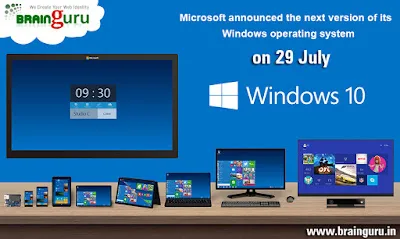
Windows 10 was the most comprehensive overhaul of Microsoft's Windows franchise to that point, a deliberate rethink after the mixed reception of Windows 8. The bigger shift, though, was conceptual. Microsoft described Windows 10 as a personalised computing environment that lets you roam across devices, from phones to tablets to desktops, with key components delivered and updated from the cloud rather than sitting as a static program on one machine.
That "platform, not product" idea is now the norm across the industry. The practical lessons still hold for any upgrade you plan:
- Updates are continuous. An OS is now a living service that receives regular feature and security updates, so your maintenance plan must be ongoing, not one-and-done.
- Cloud and device work together. Settings, files and preferences increasingly follow the user, which makes identity, backup and access policy as important as the hardware itself.
- Editions matter. Windows shipped in multiple editions (Home, Pro, Education, Enterprise, Mobile and IoT variants among them), so matching the right edition to each role avoids paying for features you do not need (or missing ones you do).
How to plan an OS migration without disrupting your business
A smooth migration is mostly about sequencing. Here is a practical order of operations that works for a small office or a multi-branch company across Delhi NCR, Noida and beyond.
- Inventory every device. List each PC, laptop and tablet, its current OS, age and role. You cannot upgrade what you have not counted.
- Check hardware eligibility. Confirm each machine meets the new version's minimum requirements. Devices that do not qualify become a budgeted replacement, not a blocker.
- Audit your software. Verify that your accounting, ERP, design and line-of-business apps are supported on the target OS before you move.
- Back up everything. Take a full, verified backup of data and settings before any upgrade begins.
- Pilot with a small group. Upgrade a handful of representative machines first, gather feedback, and fix issues before the wider rollout.
- Roll out in waves. Migrate department by department so support stays manageable and no single team is fully offline.
- Train and document. A short walkthrough of what is new prevents a flood of support tickets in week one.
Choosing the right edition and licensing
Most businesses do not need the most expensive edition on every desk. Map editions to roles: standard staff are usually well served by a Pro-equivalent edition, while regulated, security-heavy or large deployments may justify Enterprise features and central management. Always confirm current licensing terms directly with the vendor or an authorised partner before you buy. Software pricing and upgrade offers change over time.
| Consideration | Home / standard edition | Pro / business edition | Enterprise edition |
|---|---|---|---|
| Best for | Personal or very small use | Most businesses and teams | Large or regulated organisations |
| Central management | Limited | Good | Extensive |
| Advanced security controls | Basic | Stronger | Most comprehensive |
| Typical fit | Single users | SMEs and growing firms | Enterprises and government |
The same logic applies beyond Windows: whatever platform your team runs, choose the edition that matches the work, not the brochure.
Security, backups and lifecycle management
The single biggest reason to stay on a supported OS is security. Once a version reaches end of support, it stops getting patches, and attackers actively look for those gaps. Treat lifecycle management as a recurring rhythm, not a panic at end of life.
- Keep every device on a supported, regularly updated OS version.
- Enable automatic security updates and verify they are actually installing.
- Maintain tested, off-site or cloud backups so a failed upgrade or attack is recoverable.
- Run a periodic security review of your devices, websites and apps.
If you want a structured starting point, our guides on cybersecurity for Indian SMEs and running a cyber security audit for your website and apps walk through the essentials, and our data protection services for SMEs overview covers safeguarding business data during and after a migration.
Beyond the OS: modernising your full digital stack
A major OS release is the perfect prompt to look at the rest of your technology. New, supported devices and browsers are also the platforms on which your customers experience your brand, so the upgrade conversation naturally extends to your website, apps and digital presence.
- Your website. A modern OS and browser deserve a fast, secure, mobile-friendly site. See why your brand needs a modern, mobile-friendly website and explore professional web development and responsive web design.
- Your apps. If your team or customers rely on software, keeping it current matters as much as the OS. Our web development services guide and mobile app development capabilities cover building and maintaining reliable applications.
- Your visibility. A faster, more secure stack supports better search performance; pair it with a sound plan from our complete SEO guide for Indian businesses.
Related Services
- Technology Services & AI Solutions
- Software Development Services in India
- Cloud Migration Services Seamless & Secure Solutions
- Cloud Services in India | AWS, Azure, GCP
- Corporate Training Services Upskill & Grow
- DevOps as a Service Scalable & Secure Solutions
Frequently Asked Questions
Why should a business upgrade its operating system?
Upgrading keeps your devices receiving security patches, ensures compatibility with current business software, and improves speed and reliability. Running an unsupported OS leaves you exposed to security risks and eventual software failures.
What was special about the Windows 10 launch?
Windows 10 was first released on 29 July 2015 as a free upgrade for many eligible Windows 7 and Windows 8.1 devices, and it reframed Windows as a continuously updated, cloud-connected platform rather than a static program. Windows 10 reached end of support on 14 October 2025, so confirm current upgrade paths, offers and support timelines directly with Microsoft.
How do I plan an OS migration without disrupting work?
Inventory your devices, check hardware and software compatibility, back up everything, pilot with a small group, then roll out in waves by department. This staged approach keeps support manageable and avoids taking whole teams offline at once.
Which Windows edition should my business choose?
Match the edition to the role: a Pro-level edition suits most businesses, while large or regulated organisations may need Enterprise features and central management. Confirm current licensing terms with the vendor or an authorised partner before purchasing.
What happens if we keep using an unsupported operating system?
An unsupported OS stops receiving security updates, making it a prime target for malware and data breaches, and modern apps and browsers gradually stop working on it. The safer, more cost-effective path is a planned upgrade before end of support.
Can Brainguru Technologies help with our digital modernisation?
Yes. Brainguru Technologies helps Indian businesses modernise their digital stack, from secure, responsive websites and apps to SEO and digital marketing, so your online presence keeps pace with your upgraded devices. Reach us at +91-8010010000.
A well-planned operating-system upgrade is one of the highest-return, lowest-drama investments a business can make in its own resilience. Whether you are hardening your security or modernising the website and apps your customers see, Brainguru Technologies can help you plan and execute it cleanly. Call us at +91-8010010000 or get in touch to talk through your roadmap.
Related Articles
Visual Search: How It Works and How to Optimize for It
Visual search lets people search using a photo instead of words. Learn how it works and how to optimize your images so Indian businesses get discovered.
Read More
Email Marketing for Business: Why Email Still Wins
Email marketing remains one of the most cost-efficient, owned channels in business. Learn how email began in 1971 and how to build a programme that converts.
Read More
Windows Keyboard Shortcuts for Business Productivity
Windows keyboard shortcuts are the simplest productivity upgrade for any team. Learn the essential shortcuts for modern Windows and why navigation efficiency pays off.
Read More
Comments
Be the first to share your thoughts on this article.