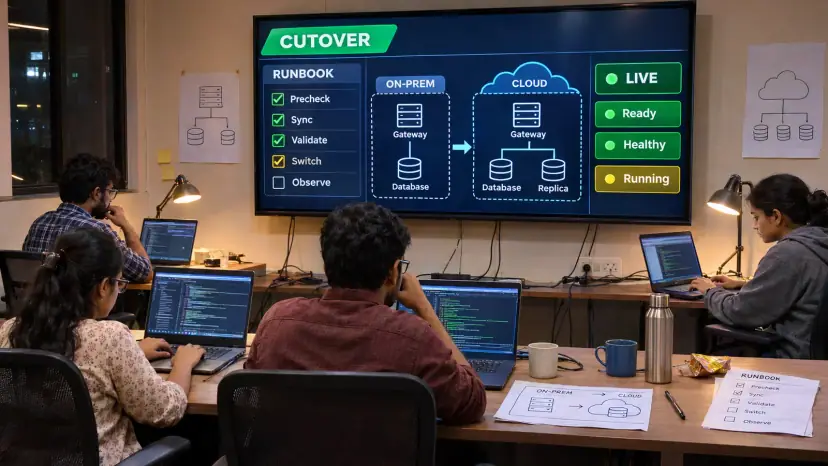
Cloud migration services move your applications, data and servers from your own hardware, a data centre or another cloud to AWS, Microsoft Azure or Google Cloud. Brainguru assesses what you run, plans the move workload by workload, carries it out in stages with testing and rollback plans, and helps you run and tune the new setup afterwards.
Why businesses move to the cloud
A move is worth doing when it solves a real problem. Common reasons are:
- Ageing hardware: Servers near the end of their life, with a replacement bill coming.
- Uneven demand: Traffic that peaks at month end, during sales or in admission season, which owned servers cannot follow.
- Resilience: Backups and disaster recovery that are hard to run well in one office or data centre.
- Speed of change: Teams that wait days or weeks for new environments.
- Remote work: Staff and partners who need secure access from anywhere.
Most businesses do not move everything. In the Flexera 2026 State of the Cloud Report, 73% of organisations operated hybrid estates, mixing cloud with their own infrastructure. A good migration plan says clearly what moves, what stays and why.
The Indian market is growing fast. IDC reported in December 2023 that India's public cloud services market is expected to reach $17.8 billion by 2027. AWS, Azure and Google Cloud all run regions in India, which helps where data needs to stay in the country or users need low latency.
Our cloud migration services
We handle each stage of the move, or the parts your own team does not want to do.
Assessment and discovery: An inventory of applications, databases, servers, licences and the connections between them, plus current performance and cost. This shows what can move, in what order and with what risk.
Platform and model choice: Public, private, hybrid or multi-cloud, and which provider fits your workloads, skills and existing licences. Our 2026 cloud provider comparison for India sets out the main differences.
Landing zone setup: The cloud foundation before anything moves: accounts, networks, identity and access, logging, backups, budgets and tagging.
Migration execution: Moving workloads in planned waves, with data copied and checked, a cutover plan for each system and a tested way back if something goes wrong.
Testing and validation: Functional, performance and security checks before each cutover, and a comparison with how the system ran before. Automated testing helps repeat the same checks for every wave.
Post-migration support: Monitoring, patching, right-sizing and cost reviews once the new setup is live, plus training for your team.
Choosing a strategy for each workload
Not every application should move the same way. AWS Prescriptive Guidance describes seven migration strategies, the 7 Rs, and the same ideas apply on Azure and Google Cloud.
- Rehost: Lift and shift, moving the application without changes.
- Relocate: Moving whole virtual machine platforms as they are.
- Replatform: Small changes during the move, such as switching to a managed database.
- Refactor: Redesigning the application to use cloud-native services.
- Repurchase: Replacing the application with a SaaS product.
- Retire: Switching off what nobody needs.
- Retain: Keeping the application where it is for now.
For large migrations, AWS recommends moving first and modernising afterwards, because refactoring during a big move is the most complex and costly option. In practice most workloads are rehosted or replatformed, and a few that justify the effort are refactored once they are running in the cloud.
How a cloud migration project runs
- Discover: Map applications, data, dependencies, users and compliance needs.
- Plan: Agree the target design, the strategy for each workload, the order of waves, downtime windows and success measures.
- Prepare: Build the landing zone, set up security and monitoring, and run a pilot with a low-risk workload.
- Migrate in waves: Move groups of related workloads, test, cut over and confirm before starting the next wave.
- Optimise: Right-size resources, set budgets, review costs and hand over runbooks and documentation.
For a fuller look at planning, cost and downtime, read our guide to cloud migration for Indian businesses.
Security and compliance during a migration
A migration changes who can reach your data and where it sits, so security is planned from the first day rather than added after.
- Encryption: Data encrypted while it moves and once it is stored.
- Identity and access: Named accounts, least-privilege roles and multi-factor sign-in for administrators.
- Logging: The CERT-In directions of April 2022 require service providers, data centres and body corporates to report listed cyber incidents within 6 hours of noticing them, and to keep ICT system logs for a rolling 180 days within Indian jurisdiction. Logging and alerting should be in place before go-live.
- Personal data: Systems holding personal data fall under the Digital Personal Data Protection Act 2023. Under the DPDP Rules notified on 13 November 2025, the main duties start on 13 May 2027.
- Backup and recovery: Backups tested by restoring them, and a recovery plan for each critical system.
For security work beyond the migration itself, see our cybersecurity and cloud solutions.
Industries we serve
- Healthcare: Patient and appointment systems that need strict access control and audit logs.
- Finance: Lending, insurance and payment systems with regulatory and audit requirements.
- E-commerce: Stores and order systems that must handle sale-day peaks.
- Manufacturing: ERP, plant and supply chain data, often in a hybrid setup.
- Education: Learning platforms and student systems with seasonal demand.
We work with AWS, Microsoft Azure and Google Cloud, with clients in India and abroad, and delivery from our Noida office.
Common migration mistakes
- Skipping discovery: Hidden dependencies cause outages at cutover.
- Copying old server sizes: Cloud servers sized like old hardware are usually too big and cost too much.
- No rollback plan: Every cutover needs a tested way back.
- Leaving cost for later: Without tags and budgets from the start, the first bills are hard to explain.
- Forgetting the people: Teams need training in running the new setup before the old one is switched off.
What affects the cost of a migration?
We quote after an assessment, because effort depends on the number and age of applications, data volumes, the strategy for each workload, downtime limits, compliance needs and the level of support after go-live. Our page on cloud migration cost in India explains each factor and the hidden costs to plan for.