In this article
- Why Google Maps matters for travellers and businesses
- Key Google Maps features that make navigation easier
- How businesses get found on Google Maps
- Google Maps vs a website: where each one wins
- Best practices to rank higher on Google Maps
- Google Maps and the shift to AI-driven local discovery
- Related Services
- Frequently Asked Questions
Google Maps has quietly become one of the most powerful free tools a business can use to get discovered, drive footfall, and guide customers to its door. What many people know as a navigation app on iOS and Android is now a full local-discovery engine: turn-by-turn lane guidance, offline maps, saved places, live traffic, transit and ride-hailing integration, and a business listing system that decides who shows up when someone nearby searches "near me." This guide explains how Google Maps works for both travellers and businesses, which features matter most, and how Indian businesses in Delhi NCR, Noida and beyond can turn a map listing into real enquiries and walk-in customers.
Editor's note: this article was first published in 2014 around a major Google Maps app update for iOS and Android. It has been rewritten as an evergreen guide to using Google Maps for navigation and business visibility, because the feature set and best practices have evolved considerably since then.
Google Maps is a free mapping and local-discovery service from Google that helps people find places, get directions across driving, transit, walking and cycling, and discover and contact nearby businesses directly from search and the map.
Why Google Maps matters for travellers and businesses
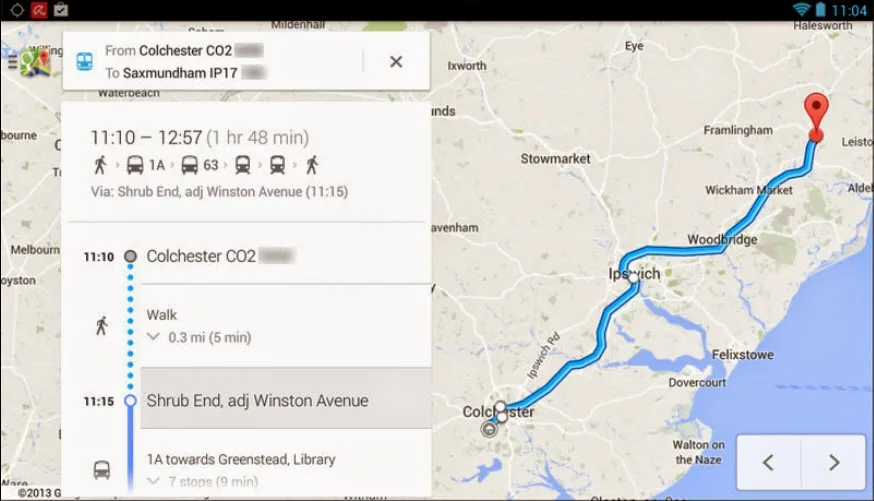
For everyday users, Google Maps removes the fear of getting lost. You search a destination, pick a route, and get spoken, step-by-step guidance the whole way. For businesses, the same app is a shop window: when someone searches for a product, service or category nearby, Google Maps and the local pack decide which businesses appear, with photos, ratings, hours and a tap-to-call button.
That dual role is what makes Maps so valuable. A strong, well-optimised presence on Google Maps is one of the highest-intent, lowest-cost channels available to a local business, and it sits at the heart of any serious local SEO strategy.
Key Google Maps features that make navigation easier
Over the years Google has layered in features that go far beyond a simple map view. The ones that matter most day to day are below.
Lane guidance and turn-by-turn navigation
Lane guidance shows you exactly which lane to stay in or move to as a junction approaches, paired with spoken, step-by-step directions instead of just a static map. This helps drivers avoid wrong turns and missed exits, especially on multi-lane flyovers and expressways common across Indian cities.
Offline maps for travel without data
You can download a map of a city or area in advance and use it for search and driving directions even with no internet connection. This is useful when travelling through areas with weak signal, or when you simply want to save mobile data on a trip.
Saved places and your own profile
Maps lets you save and organise locations, home, work, favourite restaurants, client offices, into lists tied to your Google profile, so your frequently visited places are one tap away on any device you sign in to.
Transit, walking and ride-hailing options
Beyond driving, Maps offers public-transit routing, walking directions and integration with ride-hailing services so you can compare travel options and estimated times side by side before you set off.
Live traffic and alternate routes
Real-time traffic conditions let Maps suggest the fastest route and offer alternate routes mid-journey when congestion appears ahead, so you can switch without losing your way.
How businesses get found on Google Maps
Appearing on Google Maps is not automatic, and it is not about luck. It starts with a verified business profile and is reinforced by consistent information, reviews and activity. The core building blocks are:
- A claimed and verified Google Business Profile with the correct name, address and phone number.
- Accurate categories and services so Google understands what you actually do.
- Consistent NAP (name, address, phone) across your website, directories and social profiles.
- Genuine customer reviews and timely, professional responses to them.
- Fresh photos, opening hours and posts that signal an active, real business.
Each of these signals helps Google decide how relevant, prominent and proximate your business is to a given searcher. Getting them right is the practical work behind ranking in the Maps local pack, and it pairs closely with voice search optimisation, since many "near me" searches now happen by voice.
Google Maps vs a website: where each one wins
A Maps listing and a website are not competitors, they work best together. The table below shows what each does best.
| Goal | Google Maps listing | Your website |
|---|---|---|
| Being found "near me" | Strong, high-intent discovery | Indirect, via organic SEO |
| Directions and call | One-tap, built in | Needs setup |
| Detailed services and content | Limited | Full control |
| Lead capture and conversion | Basic | Forms, chat, checkout |
| Brand storytelling | Minimal | Complete |
The takeaway: use Maps to get discovered and to make contact frictionless, then send serious prospects to a fast, mobile-friendly website that converts that interest into an enquiry or sale.
Best practices to rank higher on Google Maps
If you want your business to show up more often and more prominently, focus on the fundamentals rather than shortcuts. Ethical, guideline-compliant local SEO is what holds up over time.
- Verify and complete your profile fully, every relevant field filled in accurately.
- Choose the most specific primary category that describes your core business.
- Earn reviews honestly by asking all your customers, not just happy ones, for an honest review, and reply to every one.
- Keep details current, hours, festive timings, phone number and address.
- Add real photos regularly of your premises, team, products and work.
- Build local relevance on your site with location pages and locally focused content.
These steps connect directly to broader organic visibility. If you are building local presence from scratch, our social media strategy for local businesses and the complete SEO guide for Indian businesses are useful companions to your Maps work.
Google Maps and the shift to AI-driven local discovery
Local discovery is changing as AI features reshape how people search. Map results, AI overviews and conversational assistants increasingly summarise and recommend businesses, which raises the bar for clean, structured, trustworthy information. A complete profile, consistent data and authentic reviews are exactly the signals these systems lean on.
Forward-looking businesses are already adapting. To understand where this is heading, see how to prepare for AI-driven search results and what Google AI Overviews mean for Indian businesses.
Related Services
- Local SEO Services
- Mobile App Development Scalable & Secure Apps
- Android App Development Services in India
- Cross-Platform App Development Services
- API Development Services Seamless Integration
- Travel Solutions for Seamless Journeys AI & Tech
Frequently Asked Questions
Is Google Maps free to use?
Yes. Google Maps is free for everyday users on iOS, Android and the web for search, directions and discovery. Creating and managing a Google Business Profile to appear on the map is also free.
How do offline maps work in Google Maps?
You can download a selected area in advance while you are online, then use that downloaded map for place search and driving directions without an internet connection. It is handy in low-signal areas or to save mobile data.
What is lane guidance in Google Maps?
Lane guidance shows which lane you should be in as you approach a turn or exit, alongside spoken step-by-step directions. It helps drivers avoid wrong turns, especially at complex junctions and flyovers.
How does my business appear on Google Maps?
Create and verify a Google Business Profile with accurate name, address, phone, categories and hours. Consistent information, genuine reviews and regular updates help your business rank and appear when people search nearby.
Does ranking on Google Maps help my business get more customers?
Yes. People searching on Maps usually have high intent and are ready to call, visit or buy. Ranking well in local results can directly increase calls, direction requests and walk-ins for local businesses.
Can a local SEO agency help me rank on Google Maps?
Yes. A local SEO agency can optimise your profile, fix inconsistent listings, build local relevance and manage reviews so your business appears more prominently in Maps and local search results.
Whether you want to be found by customers searching nearby or build a complete local-search presence, getting Google Maps right is one of the highest-return moves a business can make. Brainguru Technologies helps businesses across Delhi NCR, Noida and India turn map listings and local search into real enquiries. To get started, call us at +91-8010010000 or contact our team.
Related Articles

Building a Website for Your Small Business: A Practical Guide
A website for small businesses is now essential. Learn what a modern site needs, how it works with your Google Business Profile, and how to build one that wins leads.
Read More
Google Safe Browsing Site Status: Check If Your Site Is Safe
Google Safe Browsing Site Status lets you check if your website is flagged for malware or phishing. Learn to read results, fix warnings, and stay off the blocklist.
Read More
Quantum Computing Explained: What It Means for Business
Quantum computing explained for business: what qubits are, how it differs from classical computing, where it stands, and what it means for AI and security.
Read More
Comments
Be the first to share your thoughts on this article.